
INTERACTIVE 3D BUILDER
Engineered for Infinite Configurations.
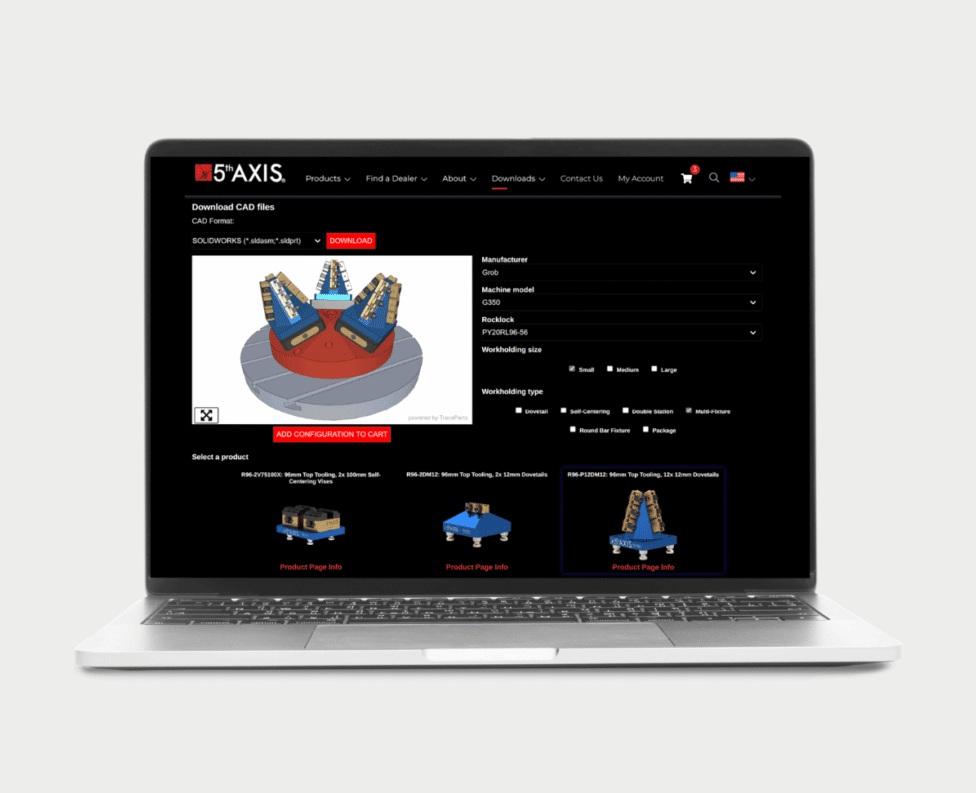
Modify physical orientations and components dynamically to eliminate setup guesswork.
Tutorial
HOW TO CONFIGURE.
1
Define Your Setup
Select your machine, interface, and key parameters like stock shape and parts per cycle.
2
Build Your Configuration
Choose your workholding type and components, then refine the setup for proper fit and alignment.
3
Export & Execute
Download the CAD assembly and move into programming or production with confidence.
UNABLE TO FIGURE IT OUT?
Our applications engineering team is available to assist with complex setups, custom fixturing requirements, and integration questions.
Q1 — What CAD formats are available for export?
The configurator and product catalog offer CAM-ready 3D models in commonly used neutral and native formats, such as STEP, IGES, and Parasolid. You can drop them into your CAD/CAM software without re-measuring or rebuilding the geometry. If you need a format that isn’t listed, contact our team and we’ll help.
Q2 — How accurate are the generated configurations?
Configurations are built from the actual product geometry and the standard 52mm / 96mm interface, so the models match the physical parts. RockLock™ systems are designed for repeatability of ±0.0003″, and the configurator preserves that by pairing only components that are designed to work together. For critical or tight-tolerance applications, we still recommend a final review before ordering.
Q3 — Can I configure setups for multiple parts per cycle?
Yes. You can build multi-part setups using double station vises, multi-position adapters, tombstones, and pyramids. These let you load several parts in one cycle, which cuts changeover time and raises throughput. The right layout depends on your part size, machine envelope, and workholding style. Our support team can help you refine it.
Q4 — Does the configurator ensure compatibility with my machine?
Yes. Machine Match is built for this. You choose your CNC manufacturer, model, and RockLock™ base size, and it shows only the products that fit, previewed in 3D. Because everything uses the same 52mm / 96mm interface, you don’t need custom adapters or guesswork. If your machine isn’t listed, contact us and we’ll confirm the fit.
Q4 — Can I modify or reconfigure setups after selection?
Yes. Setups are modular, so you can swap vises, adapters, risers, or fixtures at any time. You can revisit a configuration, change components, and re-export the updated CAD models. With an account, you can also save setups, reorder, and manage your tooling and quotes from the dashboard.